


NOW Live Cams is our free web app for following Chaturbate models on your phone. Search everyone who is live right now, save your favorite models, and get a notification when one of them starts a show. It works on iPhone and Android, needs no download from an app store, and browsing is free without an account. Favorites and live alerts come with a free Chaturbate account.
What the app does
- Live list: all models online right now – women, couples, men and trans – refreshed every couple of minutes.
- Search and filters: search by name or #tag (for example #asian or #lovense), show only HD or new models, sort by viewers, followers or time online.
- Favorites: tap the star on any model. The Favorites tab shows which of them are live now.
- Alerts: a notification on your phone when a favorite goes live.
- Watch and chat: tap a model for a live preview, then "Watch & chat" opens the full room.
Why it isn't in the App Store or Google Play
Apple and Google don't allow apps whose main content is adult webcams, so no honest cam app can be listed there. NOW Live Cams is a web app instead: you add it to your home screen from the browser, and from then on it opens full-screen with its own icon, just like an app. Nothing is downloaded from unknown sources and it can't access anything else on your phone.
How to install on Android
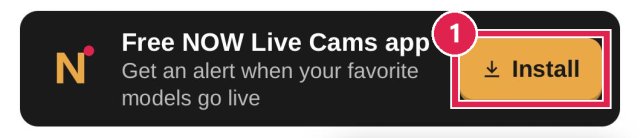
- On chaturbatenow.com tap the Install button in the app bar (marked 1 in the picture) – or open chaturbatenow.com/app in Chrome (Samsung Internet and Edge work too).
- Confirm that you are 18 or older.
- Tap Install in the window that appears, then Install again in your phone's dialog.
- Done: NOW Cams now appears on your home screen and in your app list like any other app.
No Install button? Open Chrome's menu (the three dots ⋮ at the top right) and tap Install app or Add to Home screen.
How to install on iPhone and iPad
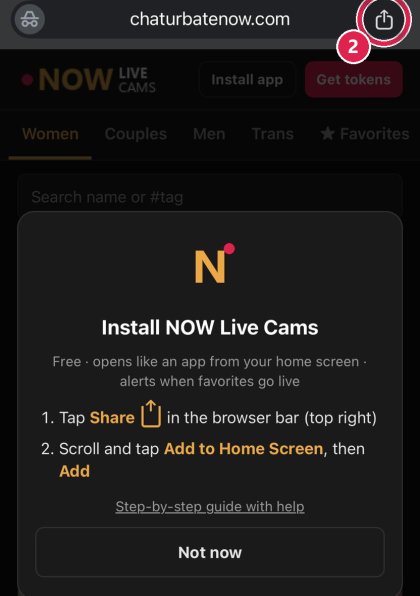
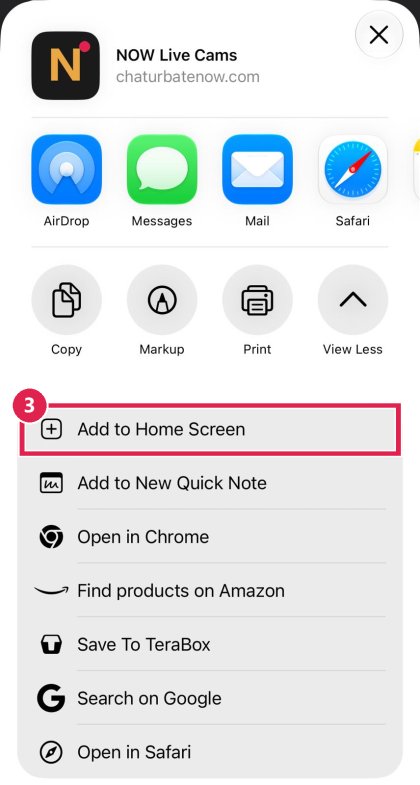
Apple doesn't let websites install apps with one tap, so on iPhone it takes three taps – they are marked 1, 2 and 3 in the pictures. The app also shows you where to tap.
- Tap Install in the app bar on chaturbatenow.com (picture above, 1) – or open chaturbatenow.com/app in Safari or Chrome. If you came from another app (Telegram, WhatsApp, Instagram, Gmail, the Google app), open the page in Safari or Chrome first – the built-in browsers of those apps can't add to the home screen.
- Tap Share (a square with an arrow pointing up, 2):
- Chrome: the Share icon is at the top right, next to the address (circled in the picture). It is not in Chrome's ••• menu at the bottom – that menu has no "Add to Home Screen".
- Safari: tap ••• at the bottom right, then Share. On older iPhones the Share button is directly in the bottom bar.
- Tap Add to Home Screen (3), then Add. Not in the list? Scroll to the very bottom, tap Edit Actions… and add it.
That's it – open the app from the new NOW Cams icon on your home screen.
More about using Chaturbate on your phone: Is there a Chaturbate app?
How to use favorites
Favorites need a free Chaturbate account. The first time you tap the ☆ star, the app asks you to create a free account or log in with the one you already have – it takes a minute, no credit card needed. Come back to the app afterwards: the model you tapped is already saved and favorites are unlocked on this phone. From then on, tap the ☆ star on any model in the list or in the room view. It turns gold and the model is saved. Open the ★ Favorites tab to see who is online now; offline favorites are shown greyed out. Tap the star again to remove a model.
How to turn on alerts
- Open the ★ Favorites tab.
- Tap Turn on next to "Get alerts when your favorites go live" and allow notifications.
- Tap Test to check: a test notification should arrive within a few seconds.
From then on you get a notification when one of your favorites starts broadcasting (the same model at most once every few hours). Tapping it opens the app on that model. Notifications never show pictures, because they can appear on a locked screen.
iPhone: alerts only work in the installed app (iOS 16.4 or newer), not in Safari itself. Install the app first, open it from the home screen and turn alerts on there.
Watching, chatting and tokens
Tap a model to see a live preview. Watch & chat opens the full room on our Chaturbate-powered site, where you can watch for free. To chat, follow models or tip, you need a free Chaturbate account – tap Create free account and you land straight in that model's room after signing up. The same login works on chaturbate.com. Tokens are only needed for tipping and private shows; see how to create a Chaturbate account and our guides on token prices and payment methods.
Questions
Is the app free?
Yes. Browsing, search and the live previews are free without an account. Favorites and live alerts are free too, but need a free Chaturbate account – the same account you use to chat and tip.
Do I need to log in? Will I lose my favorites?
For favorites and alerts you need a free Chaturbate account; the app asks for it the first time you tap a star. Your favorites are saved on your phone, inside the app. They stay there as long as you keep the app; they are lost if you delete the app, clear your browser data, or switch to another phone. On iPhone, the installed app and Safari keep separate lists, so add your favorites inside the installed app.
I don't get any alerts
- Check that alerts are on in the Favorites tab and tap Test.
- Check that notifications for the app (iPhone) or for Chrome (Android) are allowed in your phone's settings, and that Focus / Do Not Disturb is off.
- On iPhone, use the installed app, not Safari.
- You only get an alert when a favorite starts broadcasting – not for models who were already live when you added them.
How do I turn alerts off or remove the app?
Tap Turn off in the Favorites tab. To remove the app, press and hold its icon and choose Remove (iPhone) or Uninstall (Android).
Is it safe and private?
The app shows public live listings and needs no personal details. To improve it we count anonymous usage – for example how often the app is opened and which buttons are used – under a random number created by the app, together with your country. No name, e-mail or IP address is stored. If you turn on alerts, we also store your favorites list and the anonymous notification address of your phone so we can send the alerts. Adults 18+ only.